

Case Study
·
#02
Actionable Error Insights
Turning vague data-import errors into clear, actionable guidance
ROLE -
Staff Product Designer
TEAMS -
Product · Engineering · Implementation
FOCUS -
Enterprise data · Validation workflows · Error resolution · Information design

01 — CONTEXT
Defining the problem
Understanding why import errors were difficult to resolve

Users importing large datasets into our enterprise platform hit a wall. Validation errors were vague, disconnected from the failing fields, and offered no clear path to resolution.
Imports could contain hundreds or thousands of rows, each with 70–80 columns. When validation failed, errors were dumped into a single list, leaving users to work out what had gone wrong and where.
Users spent 1–3 days (sometimes up to a week) troubleshooting outside the system—via documentation, colleagues, or support tickets. First-pass success was low, and resolution cycles were inconsistent.
This wasn't just a UX annoyance—it was a business bottleneck slowing onboarding, inflating support costs, and eroding user confidence in the platform.
1–3 days
Typical time to resolve validation issues
Up to 1 week
For complex issues
Hundreds or thousands
Potential errors across a single import.
The goal: Shift validation from a dead-end error list to self-service guidance—so users resolve issues faster, retry less, and need less support.
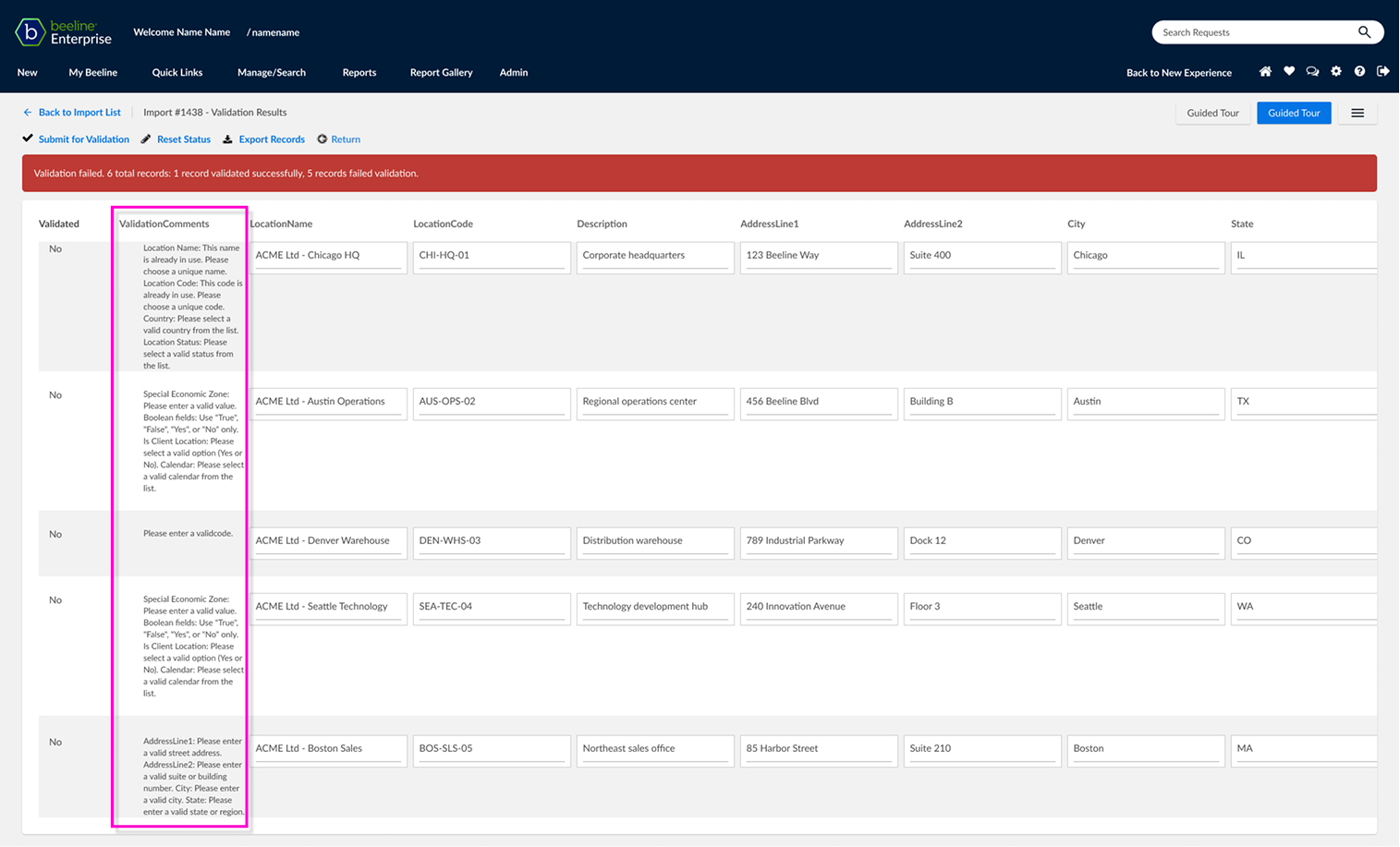
Original validation comments column
No indication which fields are failing validation

02 — CONSTRAINTS
Constraints & Context
Improving the experience without changing the underlying architecture
This was an incremental enhancement, not a redesign. The import architecture, data warehouse and flat-file logic would remain untouched.
Engineering was concurrently building an extensive backend lookup table mapping error codes to resolutions.
My brief was to make errors actionable through the interface alone, without restructuring the underlying workflow.
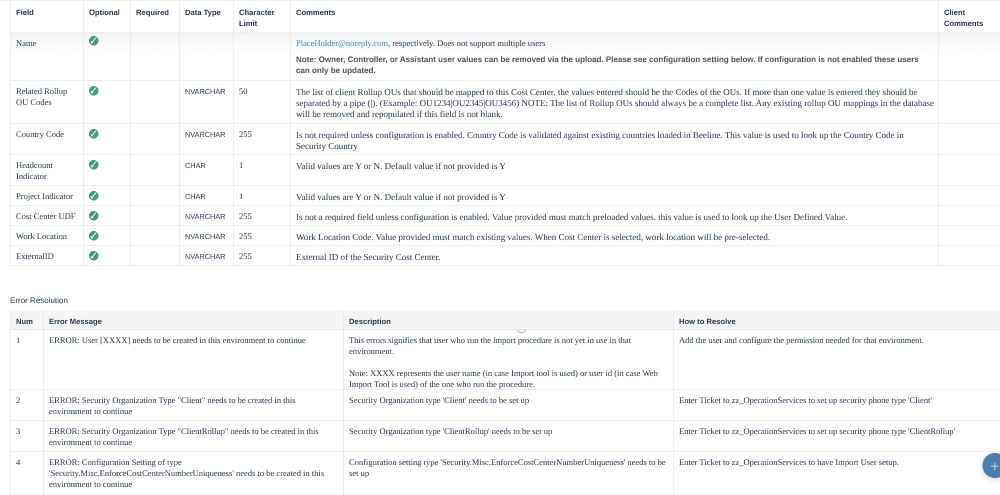
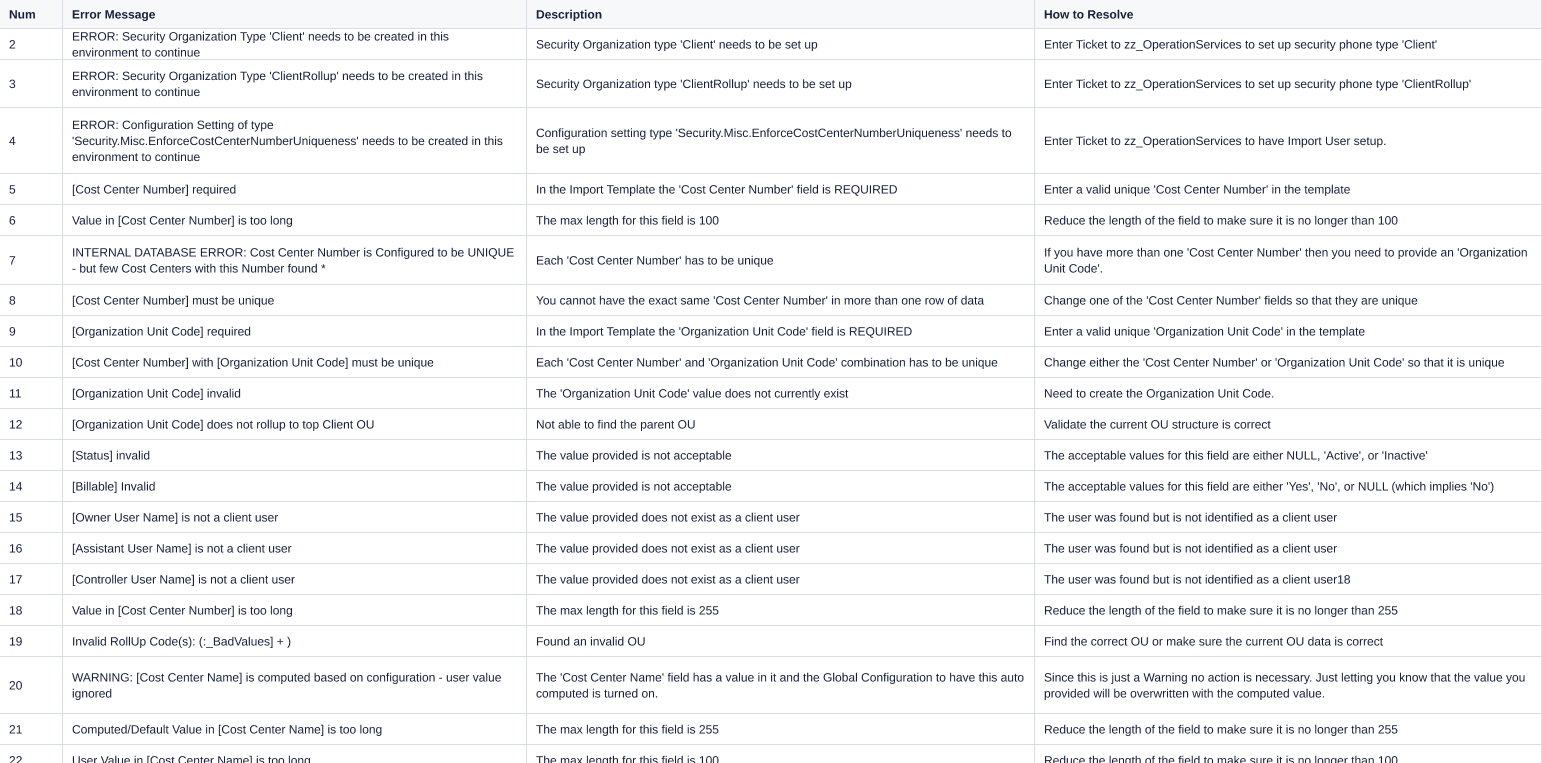
ERROR CODE MAPPING TABLE AND RESOLUTION FLOWS
03 — DISCOVERY
Current State Analysis
Mapping the current error state
I mapped the current error state with Product and Engineering. The core issues:
Ambiguous messages "Invalid reference" without identifying the field or row.
No grouping or prioritisation across rows.
Lost context between the error and the failing input.
External resolution loops increasing time-to-import and support overhead.
Engineering's lookup table would provide the underlying explanations, but the interface needed to connect each error to its context and a clear next action.

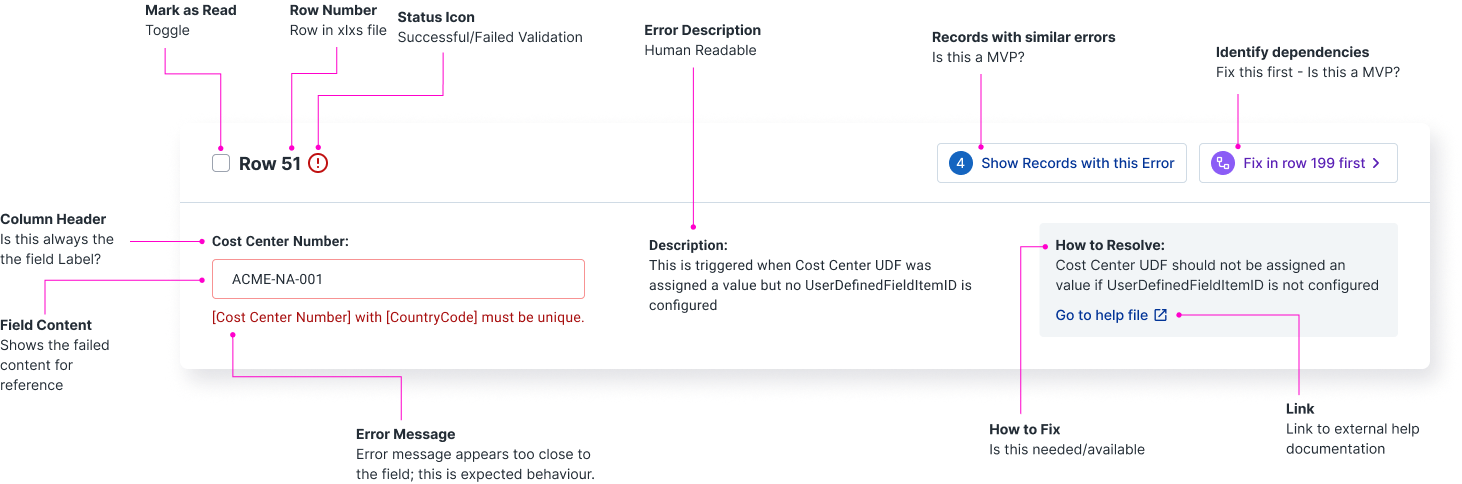
Original row with error column

Contextual field-level error messaging
DESIGN STRATEGY:
"The problem wasn't the message. It was the missing context."
Connecting each error to the field, explanation and action users needed.
04 — DESIGN EXPLORATION
Design Approach
Turning error messages into useful guidance
Stage 1: Field-level focus

I started by structuring each error around three layers:
- Error message — plain-language explanation of the issue
- What this means — context to help users understand the problem
- How to fix it — actionable guidance
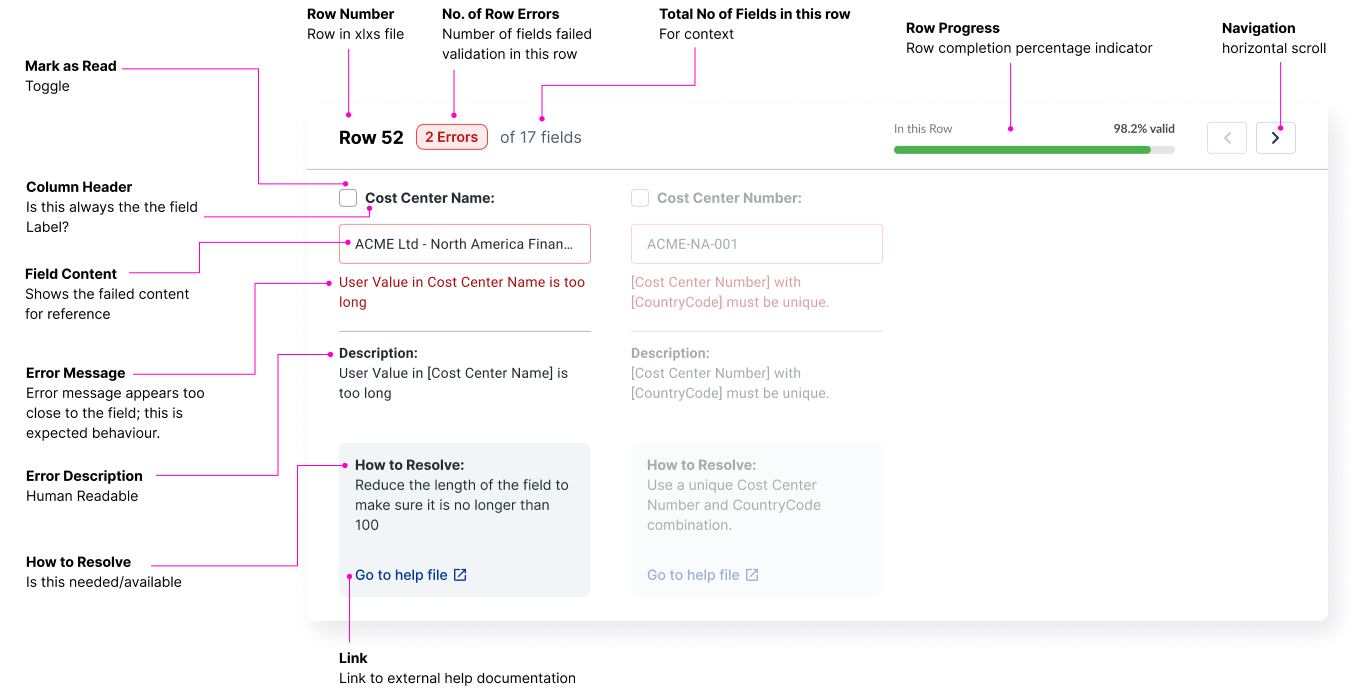
Stage 2: Card view exploration
Cards offered more room for guidance, grouping related issues and surfacing dependencies — for example, how fixing one field could resolve errors in others.
However, they broke the relationship between errors and their surrounding row data. For users working with dense spreadsheets, losing that context introduced friction.
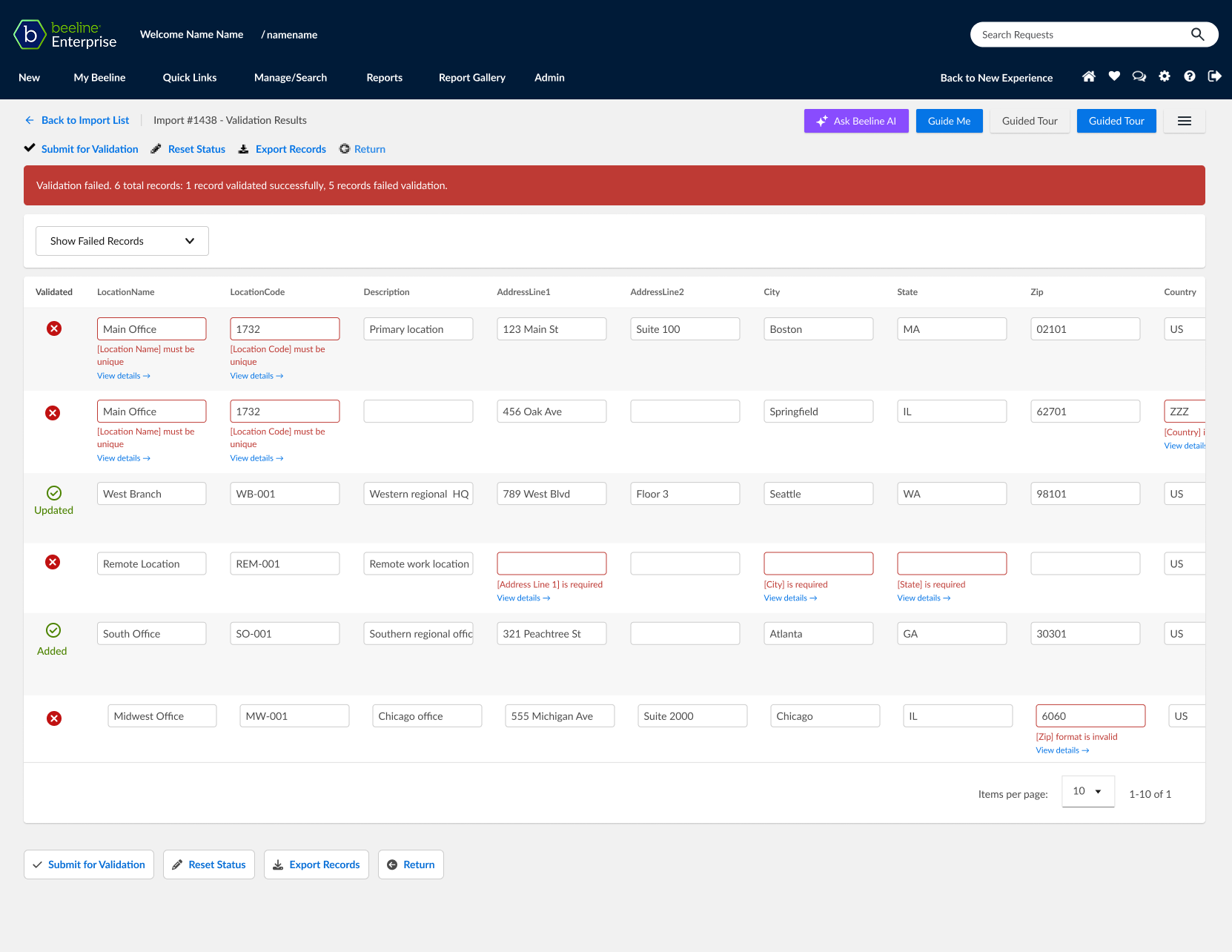
Stage 3: Vertical column format
I evolved the card concept into a vertical error column that retained the familiar table structure.
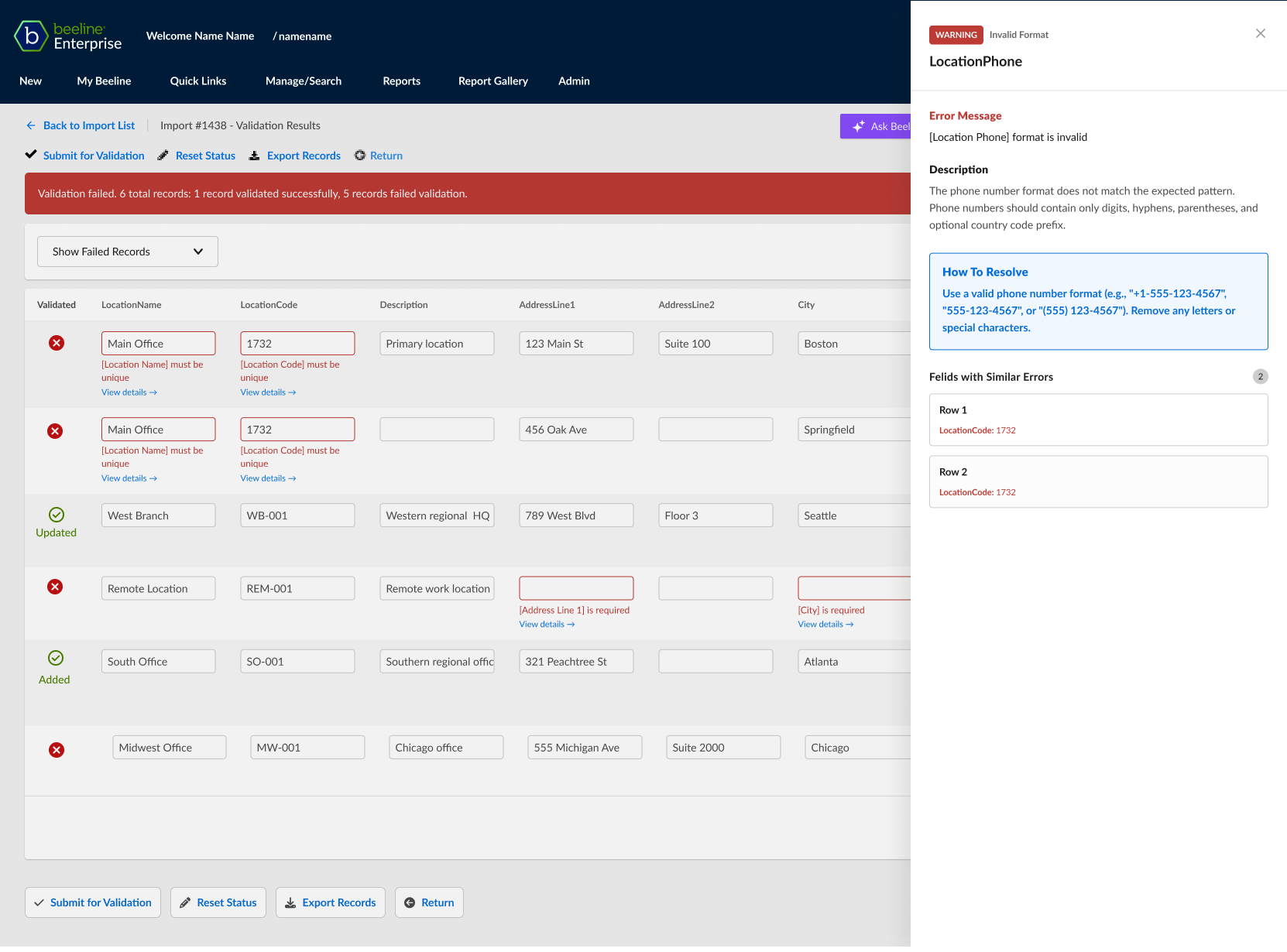
Each failing field showed a concise error summary by default, with expandable details and fixes. A side panel offered a deeper view of individual fields without cluttering the main table.
This kept guidance close to the data while preserving the row-level context users relied on.
Where cards still add value
I retained cards as a useful option for different tasks, such as filtering errors by type to identify and resolve every Invalid ManagerID across hundreds of rows.
05 — ACCESSIBILITY
Accessibility & Consistency
Making error guidance accessible and repeatable
WCAG 2.1 AA compliance, shared templates
Every error item is:
- Keyboard accessible — Every error item is focusable and navigable.
- Screen-reader friendly — Icons have accessible text alternatives.
- Colour contrast — Meets WCAG 2.1 AA requirements.
- Not colour-dependent — Icons and text reinforce meaning.
A shared error template applies across all import types, including rate cards and assignments, ensuring consistency and reducing the learning curve.
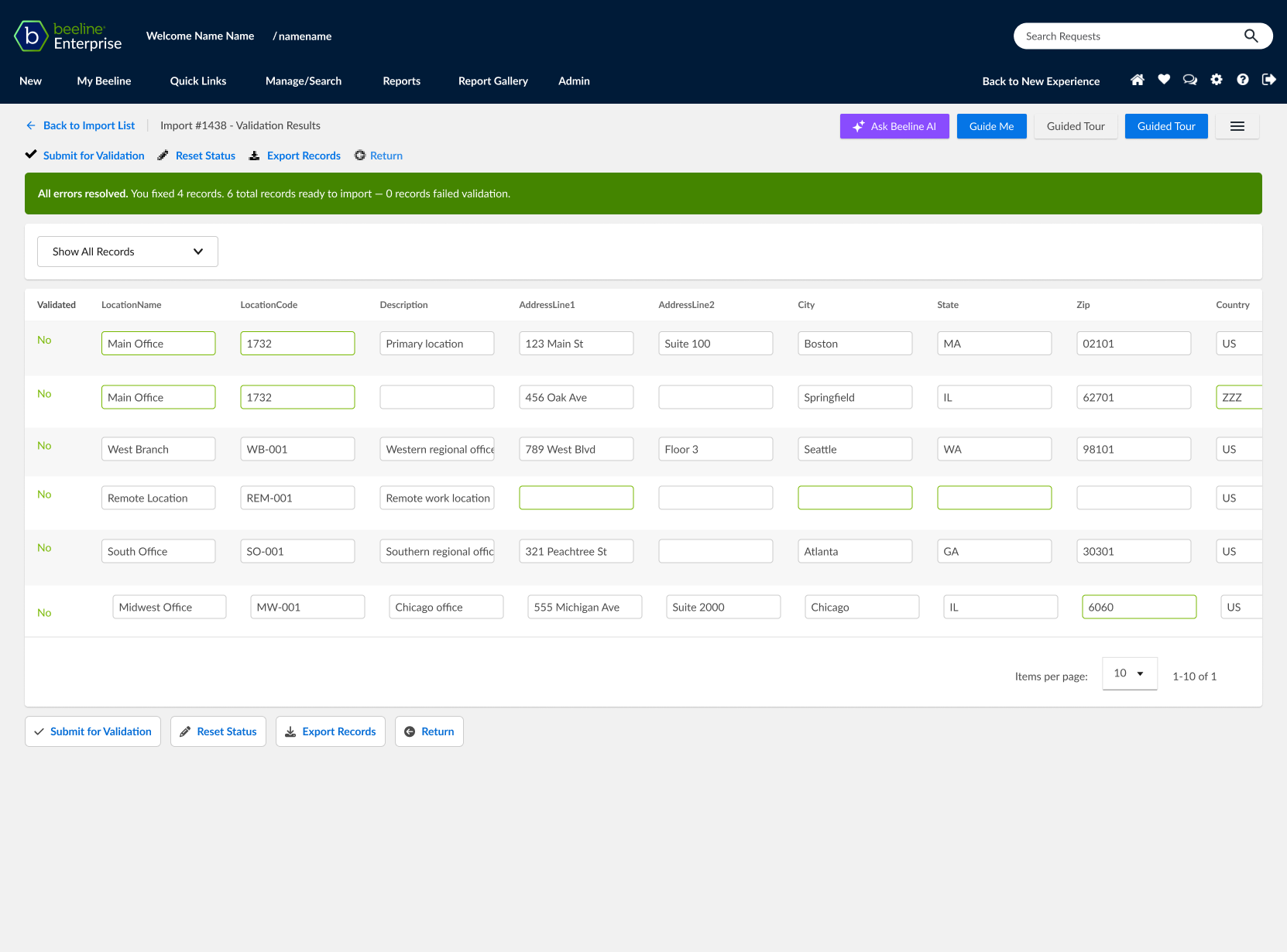
Applying error handling to dense spreadsheets
Design principle:
"Clarity before cleverness."
The goal was not to create a more sophisticated error experience, but to make the existing experience easier to understand and act on.
06 - SYSTEMS THINKING
Scaling the Solution
One error pattern, designed for reuse across the platform.
This enhancement wasn't designed in isolation. The structured error presentation model — Issue → Context → Suggested Action — is now being adopted across other validation-heavy flows in the platform.
A repeatable error structure
Issue → Context → Suggested Action — designed to work for any validation-heavy flow, not just this one
A documented progressive-disclosure pattern
Summary → Expand → Side panel. Added to the design system as a reference for high-density error states.
A reusable content matrix
Structured error-message guidance that other product areas can adapt for their own validation and workflow errors.
An analytics framework
Metrics for error frequency and time-to-resolution, ready to instrument as the pattern is adopted elsewhere.
Expected impact: reduced support load across multiple import categories, faster consultant onboarding, and a consistent error-resolution mental model across the platform.
Cards and row-based options
Filtering and sorting across complex error sets
07 — IMPACT
Outcomes and next steps
From “something went wrong” to “here’s what to do”
Expected impact: reduced support load across multiple import categories, faster consultant onboarding, and a consistent error-resolution mental model across the platform.
A clearer route to resolutionMoving from disconnected error messages to contextual explanations and actionable guidance.
A more consistent experienceEstablishing a reusable error presentation pattern for validation-heavy workflows.
A foundation for measurement Defining the analytics needed to track error frequency, time-to-resolution and self-service success.
Expected impact

- Reduced validation resolution time — target: days to hours.
- Increased first-pass import completion.
- Fewer support interventions across import categories.
- Faster consultant onboarding through standardised error language.
- A consistent error-resolution mental model across the platform.
How success will be measured
- Error frequency by import type.
- Average time-to-resolution.
- Self-service resolution rate.
- User feedback on clarity and confidence.

AI ANALYSES DATA against validation rules.
FUTURE OPPORTUNITY:
"From error guidance to assisted resolution"
Exploring how AI could help users identify and correct data issues.
08 — FUTURE OPPORTUNITY
Future Opportunity
From error guidance to assisted resolution
The current work moves validation from a raw error list to clear, contextual guidance. The next evolution is to move from explaining errors to helping resolve them—using AI to analyse failed data against validation rules, historical records, and system context to infer what the user likely intended.
AI-assisted capabilities:
Infer missing data
Suggest a historical or contextual value where the evidence is strong.
Translate data
Map user-entered values to the platform's taxonomy or required format.
Detect anomalies
Identify relationships that look wrong, such as dates or times that don't logically align.
Explain compliance
Translate complex system rules into plain language and explain why data fails validation.
Suggest a correction
Propose specific changes, with supporting evidence, for users to review and apply.


Home
Work
About
Contact
Case Study
·
#02
Actionable Error Insights
Turning vague data-import errors into clear, actionable guidance
ROLE -
Staff Product Designer
TEAMS -
Product · Engineering · Implementation
FOCUS -
Enterprise data · Validation workflows · Error resolution · Information design
01 — CONTEXT
Defining the problem
Understanding why import errors were difficult to resolve

Users importing large datasets into our enterprise platform hit a wall. Validation errors were vague, disconnected from the failing fields, and offered no clear path to resolution.
Imports could contain hundreds or thousands of rows, each with 70–80 columns. When validation failed, errors were dumped into a single list, leaving users to work out what had gone wrong and where.
Users spent 1–3 days (sometimes up to a week) troubleshooting outside the system—via documentation, colleagues, or support tickets. First-pass success was low, and resolution cycles were inconsistent.
This wasn't just a UX annoyance—it was a business bottleneck slowing onboarding, inflating support costs, and eroding user confidence in the platform.
1–3 days
Typical time to resolve validation issues
Up to 1 week
For complex issues
Hundreds or thousands
Potential errors across a single import.
The goal: Shift validation from a dead-end error list to self-service guidance—so users resolve issues faster, retry less, and need less support.
Original validation comments column
No indication which fields are failing validation
02 — CONSTRAINTS
Constraints & Context
Improving the experience without changing the underlying architecture
This was an incremental enhancement, not a redesign. The import architecture, data warehouse and flat-file logic would remain untouched.
Engineering was concurrently building an extensive backend lookup table mapping error codes to resolutions.
My brief was to make errors actionable through the interface alone, without restructuring the underlying workflow.
ERROR CODE MAPPING TABLE AND RESOLUTION FLOWS
03 — DISCOVERY
Current State Analysis
Mapping the current error state
I mapped the current error state with Product and Engineering. The core issues:
Ambiguous messages "Invalid reference" without identifying the field or row.
No grouping or prioritisation across rows.
Lost context between the error and the failing input.
External resolution loops increasing time-to-import and support overhead.
Engineering's lookup table would provide the underlying explanations, but the interface needed to connect each error to its context and a clear next action.
Original row with error column
Contextual field-level error messaging
DESIGN STRATEGY:
"The problem wasn't the message. It was the missing context."
Connecting each error to the field, explanation and action users needed.
04 — DESIGN EXPLORATION
Design Approach
Turning error messages into useful guidance
Stage 1: Field-level focus

I started by structuring each error around three layers:
- Error message — plain-language explanation of the issue
- What this means — context to help users understand the problem
- How to fix it — actionable guidance
Stage 2: Card view exploration
Cards offered more room for guidance, grouping related issues and surfacing dependencies — for example, how fixing one field could resolve errors in others.
However, they broke the relationship between errors and their surrounding row data. For users working with dense spreadsheets, losing that context introduced friction.
Stage 3: Vertical column format

I evolved the card concept into a vertical error column that retained the familiar table structure.
Each failing field showed a concise error summary by default, with expandable details and fixes. A side panel offered a deeper view of individual fields without cluttering the main table.
This kept guidance close to the data while preserving the row-level context users relied on.
Where cards still add value
I retained cards as a useful option for different tasks, such as filtering errors by type to identify and resolve every Invalid ManagerID across hundreds of rows.
05 — ACCESSIBILITY
Accessibility & Consistency
Making error guidance accessible and repeatable
WCAG 2.1 AA compliance, shared templates
Every error item is:
- Keyboard accessible — Every error item is focusable and navigable.
- Screen-reader friendly — Icons have accessible text alternatives.
- Colour contrast — Meets WCAG 2.1 AA requirements.
- Not colour-dependent — Icons and text reinforce meaning.
A shared error template applies across all import types, including rate cards and assignments, ensuring consistency and reducing the learning curve.
Applying error handling to dense spreadsheets
Design principle:
"Clarity before cleverness."
The goal was not to create a more sophisticated error experience, but to make the existing experience easier to understand and act on.
06 - SYSTEMS THINKING
Scaling the Solution
One error pattern, designed for reuse across the platform.
This enhancement wasn't designed in isolation. The structured error presentation model — Issue → Context → Suggested Action — is now being adopted across other validation-heavy flows in the platform.
A repeatable error structure
Issue → Context → Suggested Action — designed to work for any validation-heavy flow, not just this one
A documented progressive-disclosure pattern
Summary → Expand → Side panel. Added to the design system as a reference for high-density error states.
A reusable content matrix
Structured error-message guidance that other product areas can adapt for their own validation and workflow errors.
An analytics framework
Metrics for error frequency and time-to-resolution, ready to instrument as the pattern is adopted elsewhere.
Expected impact: reduced support load across multiple import categories, faster consultant onboarding, and a consistent error-resolution mental model across the platform.
Cards and row-based options
Filtering and sorting across complex error sets
07 — IMPACT
Outcomes and next steps
From “something went wrong” to “here’s what to do”
Expected impact: reduced support load across multiple import categories, faster consultant onboarding, and a consistent error-resolution mental model across the platform.
A clearer route to resolutionMoving from disconnected error messages to contextual explanations and actionable guidance.
A more consistent experienceEstablishing a reusable error presentation pattern for validation-heavy workflows.
A foundation for measurement Defining the analytics needed to track error frequency, time-to-resolution and self-service success.
Expected impact

- Reduced validation resolution time — target: days to hours.
- Increased first-pass import completion.
- Fewer support interventions across import categories.
- Faster consultant onboarding through standardised error language.
- A consistent error-resolution mental model across the platform.
How success will be measured
- Error frequency by import type.
- Average time-to-resolution.
- Self-service resolution rate.
- User feedback on clarity and confidence.
AI ANALYSES DATA against validation rules.
FUTURE OPPORTUNITY:
"From error guidance to assisted resolution"
Exploring how AI could help users identify and correct data issues.
08 — FUTURE OPPORTUNITY
Future Opportunity
From error guidance to assisted resolution
The current work moves validation from a raw error list to clear, contextual guidance. The next evolution is to move from explaining errors to helping resolve them—using AI to analyse failed data against validation rules, historical records, and system context to infer what the user likely intended.
AI-assisted capabilities:
Infer missing data

Suggest a historical or contextual value where the evidence is strong.
Translate data
Map user-entered values to the platform's taxonomy or required format.
Detect anomalies
Identify relationships that look wrong, such as dates or times that don't logically align.
Explain compliance
Translate complex system rules into plain language and explain why data fails validation.
Suggest a correction

Propose specific changes, with supporting evidence, for users to review and apply.
Home
Work
About
Contact
Case Study
·
#02
Actionable Error Insights
Turning vague data-import errors into clear, actionable guidance
ROLE -
Staff Product Designer
TEAMS -
Product · Engineering · Implementation
FOCUS -
Enterprise data · Validation workflows · Error resolution · Information design
01 — CONTEXT
Defining the problem
Understanding why import errors were difficult to resolve

Users importing large datasets into our enterprise platform hit a wall. Validation errors were vague, disconnected from the failing fields, and offered no clear path to resolution.
Imports could contain hundreds or thousands of rows, each with 70–80 columns. When validation failed, errors were dumped into a single list, leaving users to work out what had gone wrong and where.
Users spent 1–3 days (sometimes up to a week) troubleshooting outside the system—via documentation, colleagues, or support tickets. First-pass success was low, and resolution cycles were inconsistent.
This wasn't just a UX annoyance—it was a business bottleneck slowing onboarding, inflating support costs, and eroding user confidence in the platform.
1–3 days
Typical time to resolve validation issues
Up to 1 week
For complex issues
Hundreds or thousands
Potential errors across a single import.
The goal: Shift validation from a dead-end error list to self-service guidance—so users resolve issues faster, retry less, and need less support.
Original validation comments column
No indication which fields are failing validation
02 — CONSTRAINTS
Constraints & Context
Improving the experience without changing the underlying architecture
This was an incremental enhancement, not a redesign. The import architecture, data warehouse and flat-file logic would remain untouched.
Engineering was concurrently building an extensive backend lookup table mapping error codes to resolutions.
My brief was to make errors actionable through the interface alone, without restructuring the underlying workflow.
ERROR CODE MAPPING TABLE AND RESOLUTION FLOWS
03 — DISCOVERY
Current State Analysis
Mapping the current error state
I mapped the current error state with Product and Engineering. The core issues:
Ambiguous messages "Invalid reference" without identifying the field or row.
No grouping or prioritisation across rows.
Lost context between the error and the failing input.
External resolution loops increasing time-to-import and support overhead.
Engineering's lookup table would provide the underlying explanations, but the interface needed to connect each error to its context and a clear next action.
Original row with error column
Contextual field-level error messaging
DESIGN STRATEGY:
"The problem wasn't the message. It was the missing context."
Connecting each error to the field, explanation and action users needed.
04 — DESIGN EXPLORATION
Design Approach
Turning error messages into useful guidance
Stage 1: Field-level focus

I started by structuring each error around three layers:
- Error message — plain-language explanation of the issue
- What this means — context to help users understand the problem
- How to fix it — actionable guidance
Stage 2: Card view exploration
Cards offered more room for guidance, grouping related issues and surfacing dependencies — for example, how fixing one field could resolve errors in others.
However, they broke the relationship between errors and their surrounding row data. For users working with dense spreadsheets, losing that context introduced friction.
Stage 3: Vertical column format
I evolved the card concept into a vertical error column that retained the familiar table structure.
Each failing field showed a concise error summary by default, with expandable details and fixes. A side panel offered a deeper view of individual fields without cluttering the main table.
This kept guidance close to the data while preserving the row-level context users relied on.
Where cards still add value
I retained cards as a useful option for different tasks, such as filtering errors by type to identify and resolve every Invalid ManagerID across hundreds of rows.
05 — ACCESSIBILITY
Accessibility & Consistency
Making error guidance accessible and repeatable
WCAG 2.1 AA compliance, shared templates
Every error item is:
- Keyboard accessible — Every error item is focusable and navigable.
- Screen-reader friendly — Icons have accessible text alternatives.
- Colour contrast — Meets WCAG 2.1 AA requirements.
- Not colour-dependent — Icons and text reinforce meaning.
A shared error template applies across all import types, including rate cards and assignments, ensuring consistency and reducing the learning curve.
Applying error handling to dense spreadsheets
Design principle:
"Clarity before cleverness."
The goal was not to create a more sophisticated error experience, but to make the existing experience easier to understand and act on.
06 - SYSTEMS THINKING
Scaling the Solution
One error pattern, designed for reuse across the platform.

This enhancement wasn't designed in isolation. The structured error presentation model — Issue → Context → Suggested Action — is now being adopted across other validation-heavy flows in the platform.
A repeatable error structure
Issue → Context → Suggested Action — designed to work for any validation-heavy flow, not just this one
A documented progressive-disclosure pattern
Summary → Expand → Side panel. Added to the design system as a reference for high-density error states.
A reusable content matrix
Structured error-message guidance that other product areas can adapt for their own validation and workflow errors.
An analytics framework
Metrics for error frequency and time-to-resolution, ready to instrument as the pattern is adopted elsewhere.
Expected impact: reduced support load across multiple import categories, faster consultant onboarding, and a consistent error-resolution mental model across the platform.
Cards and row-based options
Filtering and sorting across complex error sets
07 — IMPACT
Outcomes and next steps
From “something went wrong” to “here’s what to do”
Expected impact: reduced support load across multiple import categories, faster consultant onboarding, and a consistent error-resolution mental model across the platform.
A clearer route to resolutionMoving from disconnected error messages to contextual explanations and actionable guidance.
A more consistent experienceEstablishing a reusable error presentation pattern for validation-heavy workflows.
A foundation for measurement Defining the analytics needed to track error frequency, time-to-resolution and self-service success.
Expected impact

- Reduced validation resolution time — target: days to hours.
- Increased first-pass import completion.
- Fewer support interventions across import categories.
- Faster consultant onboarding through standardised error language.
- A consistent error-resolution mental model across the platform.
How success will be measured
- Error frequency by import type.
- Average time-to-resolution.
- Self-service resolution rate.
- User feedback on clarity and confidence.
AI ANALYSES DATA against validation rules.
FUTURE OPPORTUNITY:
"From error guidance to assisted resolution"
Exploring how AI could help users identify and correct data issues.
08 — FUTURE OPPORTUNITY
Future Opportunity
From error guidance to assisted resolution
The current work moves validation from a raw error list to clear, contextual guidance. The next evolution is to move from explaining errors to helping resolve them—using AI to analyse failed data against validation rules, historical records, and system context to infer what the user likely intended.
AI-assisted capabilities:
Infer missing data

Suggest a historical or contextual value where the evidence is strong.
Translate data
Map user-entered values to the platform's taxonomy or required format.
Detect anomalies
Identify relationships that look wrong, such as dates or times that don't logically align.
Explain compliance

Translate complex system rules into plain language and explain why data fails validation.
Suggest a correction
Propose specific changes, with supporting evidence, for users to review and apply.